Introduction
Sorting
is a process by which we can arrange the elements of a list in a
specific order i.e. ascending or descending order. We can say sorting is
the process of putting a list or a group of items in a specific order.
Sorting may be alphabetical or numerical.
In
PHP, sorting is a process of arranging the elements of an array in a
specific order i.e. ascending or descending order. Using sorting you can
analyze a list in a more effective way. You can sort an array by value,
key or randomly. In the most situations we need to sort an array by
value.
Some sorting functions are as follows:
- sort()
- asort()
- rsort()
- arsort()
1. sort() function
Using the sort() function you can sort easily and simply. The example of the sort() function is as follows:
<body bgcolor="pink"><h3>Sort() Function</h3> $name=array ("Vineet","Arjun","Manish","Laxman");
echo "Before sorting the values are:".'
';
print_r($name).'
'.'
';
sort($name);
echo"
";
echo"
";
echo "After sorting values become:".'
';
print_r($name).'
';?></body>
Output
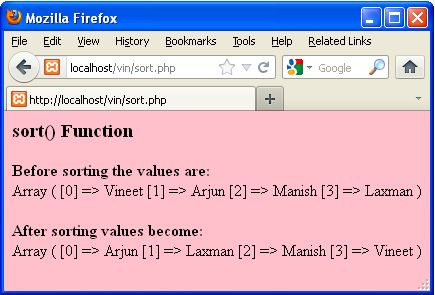
In the above example we defined four elements (names) in the array. In this example we used the sort() function. The sort() function arranges the elements of an array in ascending (alphabetically) order. You can see in the following image:
 2. asort() function
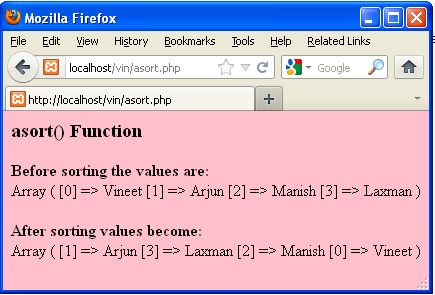
In the example above you saw that the elements of the array are arranged in ascending (alphabetically) order. The asort() function sorts an array and also maintains the index position. An example of the asort() function is as follows:
<body bgcolor="pink"><h3>Sort() Function</h3> $name=array ("Vineet","Arjun","Manish","Laxman");
echo "Before sorting the values are:".'
';
print_r($name).'
'.'
'; asort($name);
echo"
";
echo"
";
echo "After sorting values become:".'
';
print_r($name).'
';?></body>
Output
In this output you will see the array sorted by their index position.
 3. rsort() function
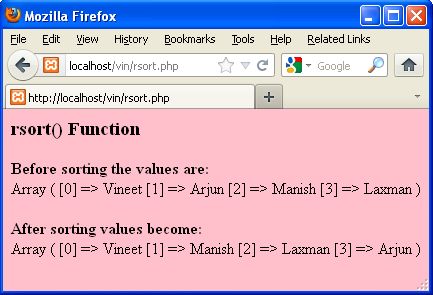
The rsort() function is used to sort an array in descending (alphabetic) order. An example of the rsort() function is as follows:
<body bgcolor="pink"><h3>Sort() Function</h3> $name=array ("Vineet","Arjun","Manish","Laxman");
echo "Before sorting the values are:".'
';
print_r($name).'
'.'
';
rsort($name);
echo"
";
echo"
";
echo "After sorting values become:".'
';
print_r($name).'
';?></body>
Output
In this output you will see the array sorted in a descending (alphabetically) order.
 4. arsort() function
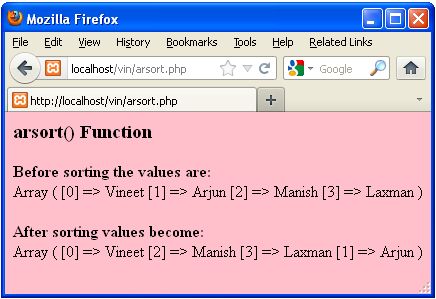
The arsort() function is a combination of asort() + rsort(). The arsort() function will sort an array in reverse order and maintain index position. The example of the arsort() function is as follows:
<body bgcolor="pink"><h3>Sort() Function</h3> $name=array ("Vineet","Arjun","Manish","Laxman");
echo "Before sorting the values are:".'
';
print_r($name).'
'.'
';
arsort($name);
echo"
";
echo"
";
echo "After sorting values become:".'
';
print_r($name).'
';?></body>
Output
 Conclusion
In this article you saw how to sort an array in PHP. Using this article one can easily understand sorting an arrays in PHP.
This article explains
how to insert and select data from a database into a HTML table in PHP.
Using an insert statement you can insert data into a database. Using a
select statement you can select the entire data from a database into a
HTML table.
First of all we will create a database.
Create The Database
<html>
<body bgcolor="pink"><center>$con = mysql_connect ("localhost","root","");
$db="MCN";if (!$con)
{
die ('Could not connect: ' . mysql_error());
}if (mysql_query ("CREATE DATABASE $db",$con)) {
echo "Your Database Created Which Name is : $db";
}else
{
echo "Error creating database: " . mysql_error();
}
mysql_close ($con);?></center>
}</body></html>
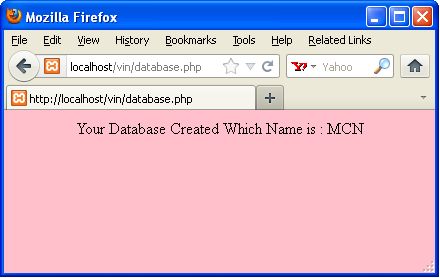
Output
In the above code, we created a database named MCN. Now we will create a table in the MCN database.
Create The Table
<body bgcolor="pink"><center>$con = mysql_connect ("localhost","root","");if (!$con)
{
die ('Could not connect: ' . mysql_error());
}
mysql_select_db ("MCN", $con);
$sql = "CREATE TABLE EMPLOYEE
(
Name varchar(50),
Designation varchar(50),
Sal int,
Qualification varchar(50)
)";
mysql_query($sql,$con);echo "Your table created which is as follows";
mysql_close($con);?><table bgcolor="skyblue" border="2"><tr>
<td colspan=2 align="center">Employee Table</td></tr>
<td>Name</td><td><input type="text" name="txt1"></td></tr>
<tr>
<td>Designation</td><td><input type="text" name="txt2"></td></tr>
<tr>
<td>Sal</td><td><input type="text" name="txt3"></td></tr>
<tr>
<td>Qualification</td><td><input type="text" name="txt4"></td></tr>
</table>
</center>
</body>
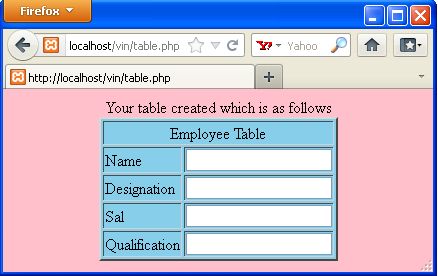
Output
In
the above code we created a table named employee. There are four fields
in the employee table i.e. name, designation, sal, qualification.
 Insert Data in Table
Now
we will write the code to insert data into the database table. The
code for inserting data into the database table is as follows:
$con=mysql_connect ("localhost","root","");
mysql_select_db("mcn",$con);
@$a=$_POST['txt1'];
@$b=$_POST['txt2'];
@$c=$_POST['txt3'];
@$d=$_POST['txt4'];if(@$_POST['inser'])
{
$s="insert into employee values ('$a','$b','$c','$d')";echo "Your Data Inserted";
mysql_query ($s);
}
$con=mysql_connect ("localhost","root","");
mysql_select_db ("mcn",$con);if(@$_POST ['sel'])
{echo $ins=mysql_query ("select * from employee");echo "
Select Data From Employee Table |
|---|
Nmae |
Designation |
Sal |
Qualification |
|---|
"
;
while ($row=mysql_fetch_array ($ins))
{
echo "
"
;
echo "" | .$row ['Name']."
"
;
echo "" | . $row ['Designation']. ""
;
echo "" | . $row ['Sal'].""
;
echo "" | .$row ['Qualification'].""
;
echo ""
;
}
}
echo ""
?><html>
<head>
</head>
<body bgcolor="pink"><table bgcolor="skyblue" border="2"><form method="post"><tr>
<td colspan=2 align="center">Employee Table</td></tr>
<td>Name</td><td><input type="text" name="txt1"></td></tr>
<tr>
<td>Designation</td><td><input type="text" name="txt2"></td></tr>
<tr>
<td>Sal</td><td><input type="text" name="txt3"></td></tr>
<tr>
<td>Qualification</td><td><input type="text" name="txt4"></td></tr>
<tr>
<td><input type="submit" name="inser" value="Insert"></td><td><input type="submit" name="sel" value="Select"></td></tr>
</form>
</table>
</body></html Output
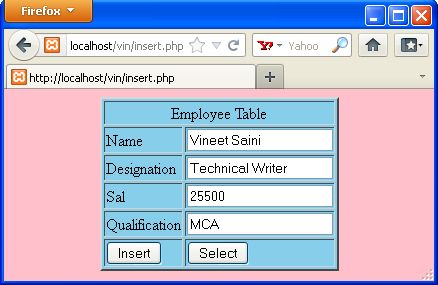
Now we will insert the data into a HTML table then click on the insert button.
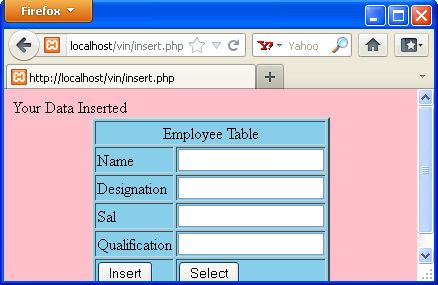
 When you click on the insert button then your data will be inserted in the database table. Like as in the following image.
 Select Data From Database
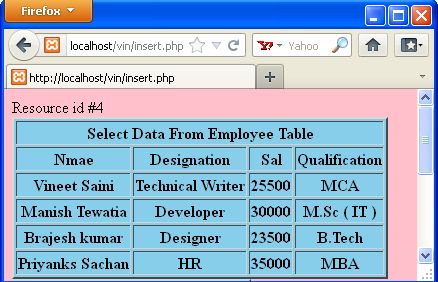
If
you want to select all data from the database into the HTML table then
you can do that. For this purpose you will be click on the select
button. When you click on the select button then your data will be
displayed in the HTML table, such as in the following image:
 Conclusion
So
in this article you saw, how to insert and select data from a database
into a HTML table. Using this article one can easily understand insert
and select data from database in to HTML table.

