Saturday, January 5, 2013

Delete Statement in PHP


In the last article I explained how to update and select data from a MySql database into a HTML table. In this article I will explain how to delete data in the database through HTML table. In this article you will see, data deleted from the front end i.e. HTML table.
Code
$con=mysql_connect ("localhost","root","");
mysql_select_db (
"mcn",$con);
@$a=$_POST[
'txt1'];
@$b=$_POST[
'txt2'];
@$c=$_POST[
'txt3'];
@$d=$_POST[
'txt4'];if(@$_POST ['del'])
{
 $s=
"delete from employee where name='$a'";echo "Your Data Deleted";
 mysql_query ($s);
}
$con=mysql_connect (
"localhost","root","");
mysql_select_db (
"mcn",$con);if(@$_POST ['sel'])
{
echo $ins=mysql_query ("select * from employee");echo "


   "
Select Data From Employee Table
NmaeDesignationSalQualification
;
  
while ($row=mysql_fetch_array($ins))
   {
  
echo " " ;
  
echo  "".$row ['Name']."
";
  
echo  "". $row ['Designation']. "";
  
echo  "". $row ['Sal']."";
  
echo  "".$row ['Qualification']."";
  
echo "";
   }
   }
 
echo ""
?><html>
<
head>
</
head>
<
body bgcolor="pink">< center>
<
table bgcolor="skyblue" border="2"><
form method="post">< tr>
<
td colspan=2 align="center">Employee Table</td></
tr>
<
td>Name</td><td><input type="text" name="txt1"></td></
tr>
<
tr>
<
td>Designation</td><td><input type="text" name="txt2"></td></
tr>
<
tr>
<
td>Sal</td><td><input type="text" name="txt3"></td></
tr>
<
tr>
<
td>Qualification</td><td><input type="text" name="txt4"></td></
tr>
<
tr>
<
td><input type="submit" name="del" value="Delete"></td><
td><input type="submit" name="sel" value="Select"></td></ tr>
</
form>
</
table>
</
center>
</
body></
html Output
First of all you will select data from the database using the select button. When you will click on the select button then you will see the data table displayed on your web page. Like as in the following image.
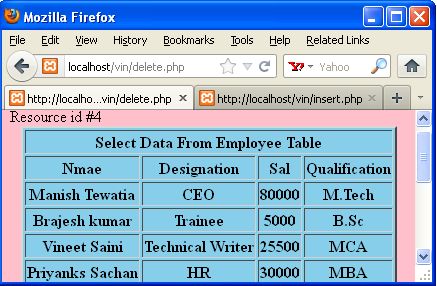
image1.jpg
Suppose you want to delete Brajesh Kumar from your database. For this purpose you will fill in the name of the employee in the employee table, then click on the delete button. You can see in the following image.
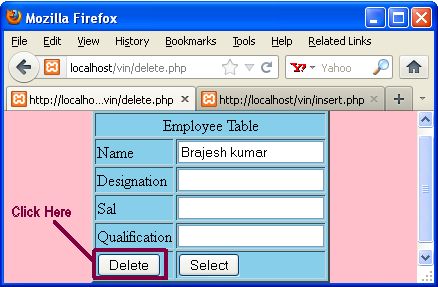
image2.jpg
When you will click on the delete button then display a message on your webpage i.e. "Your Data Deleted".
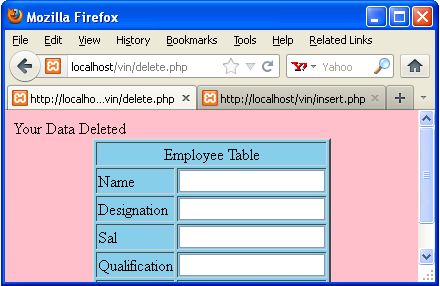
image3.jpg
Now you will click on the select button for the selected data from the database. When you click on the select button then display data table on your web page. In this table you will see Brajesh kumar employee not exist. You can see in the following image.
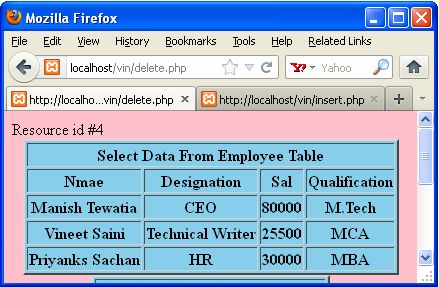
image4.jpg
Conclusion
So in this article you saw how to delete data from a database in a HTML table (front end). Using this article one can easily understand how to delete data from a database.

Update Statement in PHP


In the previous article you saw how to insert and select data from a database to a HTML table. In this article you will see how to update data in a database through HTML table. Using the update statement you can update data in your database.
Code
$con=mysql_connect ("localhost","root","");
mysql_select_db (
"mcn",$con);
@$a=$_POST[
'txt1'];
@$b=$_POST[
'txt2'];
@$c=$_POST[
'txt3'];
@$d=$_POST[
'txt4'];if(@$_POST ['up'])
{
 $s=
"update employee set Designation='$b',Sal='$c',Qualification='$d' where Name='$a'";echo "Your Data Updated.";
 mysql_query( $s);
}
$con=mysql_connect (
"localhost","root","");
mysql_select_db(
"mcn",$con);if(@$_POST ['sel'])
{
echo $ins=mysql_query ("select * from employee");echo "


   "
Select Data From Employee Table
NmaeDesignationSalQualification
;
  
while ($row=mysql_fetch_array($ins))
   {
  
echo " " ;
  
echo  "".$row ['Name']."
";
  
echo  "". $row ['Designation']. "";
  
echo  "". $row ['Sal']."";
  
echo  "".$row ['Qualification']."";
  
echo "";
   }
   }
 
echo ""
?><html>
<
head>
</
head>
<
body bgcolor="pink"><center>
<
table bgcolor="skyblue" border="2"><form method="post"><tr>
<
td colspan=2 align="center">Employee Table</td></tr>
<
td>Name</td><td><input type="text" name="txt1"></td></tr>
<
tr>
<
td>Designation</td><td><input type="text" name="txt2"></td></tr>
<
tr>
<
td>Sal</td><td><input type="text" name="txt3"></td></tr>
<
tr>
<
td>Qualification</td><td><input type="text" name="txt4"></td></tr>
<
tr>
<
td><input type="submit" name="up" value="Update"></td><td><input type="submit" name="sel" value="Select"></td></tr>
</
form>
</
table>
</
center>
</
body></html Output
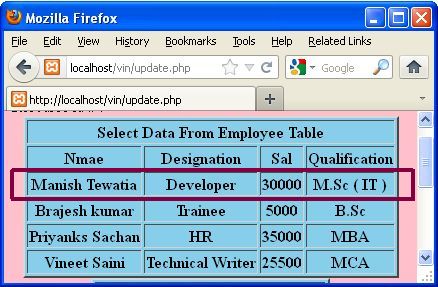
First of all we select a table from the database like as in the following image. In the following table we will change the field of Manish Tewatia.
image1.jpg
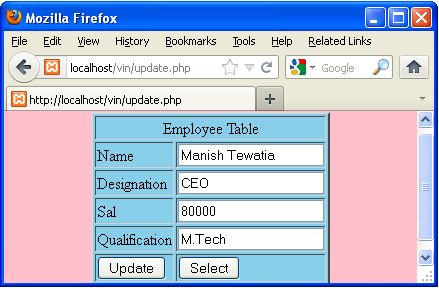
In the employee table we will fill the column for Manish Tewatia such as in the following image.
image2.jpg
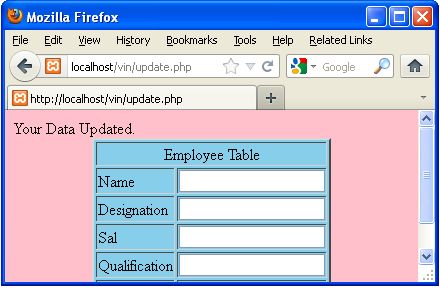
In the above table we filled designation, sal, qualification of Manish Tewatia. When you will click on the update button then your data will be updated.
image3.jpg
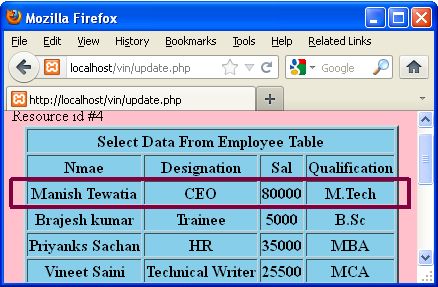
When you select a table from your database then you will get the update data of Manish Tewatia. Like as in the following image.

image4.jpg

In the above table you will see, the designation, sal, qualification changed of Manish Tewatia.
Conclusion
So in this article you saw how to update data in the database. Using this article one can easily understand update statement in PHP.